


'Fit by Wix' for 'Pilates'
Below are the step-by-step instructions to download the 'Fit by Wix' app to allow you to book 'Pilates' classes with Kasia. Scroll down to see the instructions.
If you have any issues, please call or text Kasia on 0418 683 235.
01

02
Open App & click 'Got an invite code'.
(down the bottom of the screen)

03
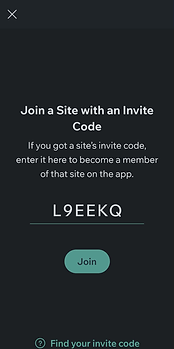
Enter code: L9EEKQ and click 'Join'.

04
Click 'Send Join Request'.

05
Click 'Continue with Email'.

06
Enter your email address, click 'Continue'.

07
Enter a password you will remember, confirm password, click 'Create Password'.

08
Wait for an email from @studio88 saying you are approved.
(I will be doing this manually but will try to approve you promptly)
Once you have received the email, click 'Join with an Invite Code' again on the 'Fit by Wix' app.
(Note: If you see another screen popping up saying you have already requested to join, just close it down by clicking 'Got It' or the 'x' in top left hand corner.)

09
Enter the code L9EEKQ and click 'Join'.
10
Click 'Join and Continue'.

11
You are now registered in the app, to book your 'Pilates' class:
-
Click 'Book a Class'.
-
Click 'Book' next to 'Pilates Reformer' class.
-
Choose the day and time that you want to book.
-
You can book up to 8 weeks in advance
-
-
Click 'Book Now'.
You can reschedule or cancel the class up to 4 hours before the class starts.
